Después de comprar un interruptor regulador, puede que se pregunte si se puede conectar a todas las luces de su casa. La respuesta es no, y tratar de hacerlo incorrectamente puede resultar en parpadeo, zumbido o incluso dañar las unidades de iluminación. La parte buena es que una vez que sabe qué buscar, es fácil determinar si sus luces son compatibles con el dimmer.
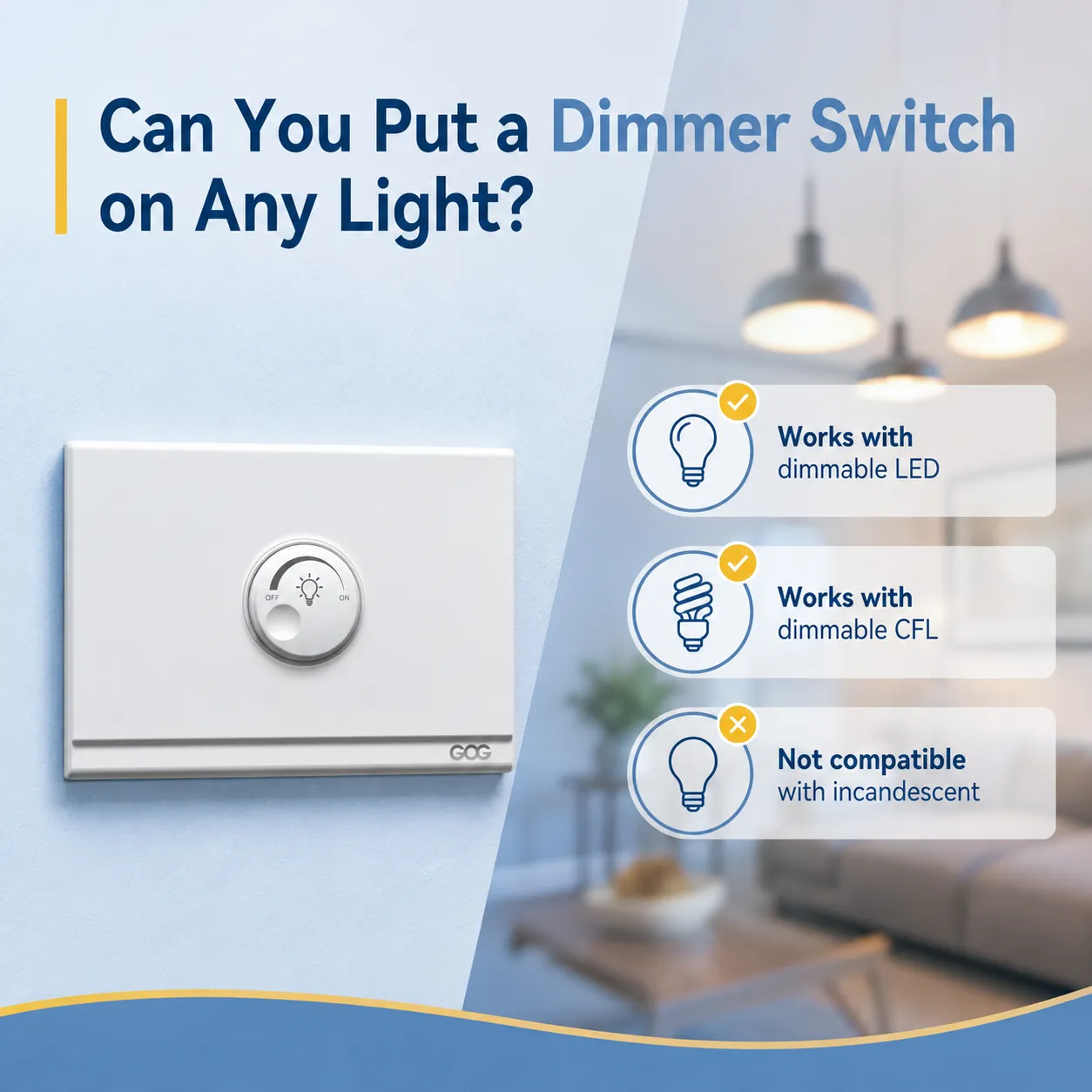
Respuesta rápida: Es imposible atenuar todos los tipos de bombillas. Las bombillas incandescentes y halógenas pueden atenuarse. Con bombillas LED y CFL, debería haberse indicado si son atenuables. Con bombillas fluorescentes, se debe usar un tipo especial de balasto para atenuar las luces. En caso de usar bombillas inteligentes (por ejemplo, Philips Hue) con atenuación incorporada, se debe evitar el interruptor de pared dimmer y usar la aplicación en su lugar.
¿Qué tipos de bombillas funcionan con interruptores dimmer?
No todas las bombillas son compatibles con dimmers. En este artículo descubrirá los diferentes tipos de luces que puede usar con interruptores dimmer.
Incandescentes y Halógenas: Universalmente Atenuables
Las bombillas como las halógenas e incandescentes pueden atenuarse fácilmente y funcionan con casi todos los tipos de dimmers disponibles en el mercado. Por lo tanto, si tiene bombillas incandescentes, puede usar estas luces con interruptores dimmer.
Los dimmers pueden soportar una carga de 600 vatios cuando se usan con bombillas incandescentes, lo que significa que puede usar entre seis y diez bombillas incandescentes a la vez. Una advertencia; siempre debe verificar el vataje total antes de comprar dimmers para usar con estas luces. Nuestra guía sobre si todas las bombillas incandescentes son atenuables cubre los detalles.
Bombillas LED: Solo si están etiquetadas como “Dimmable”
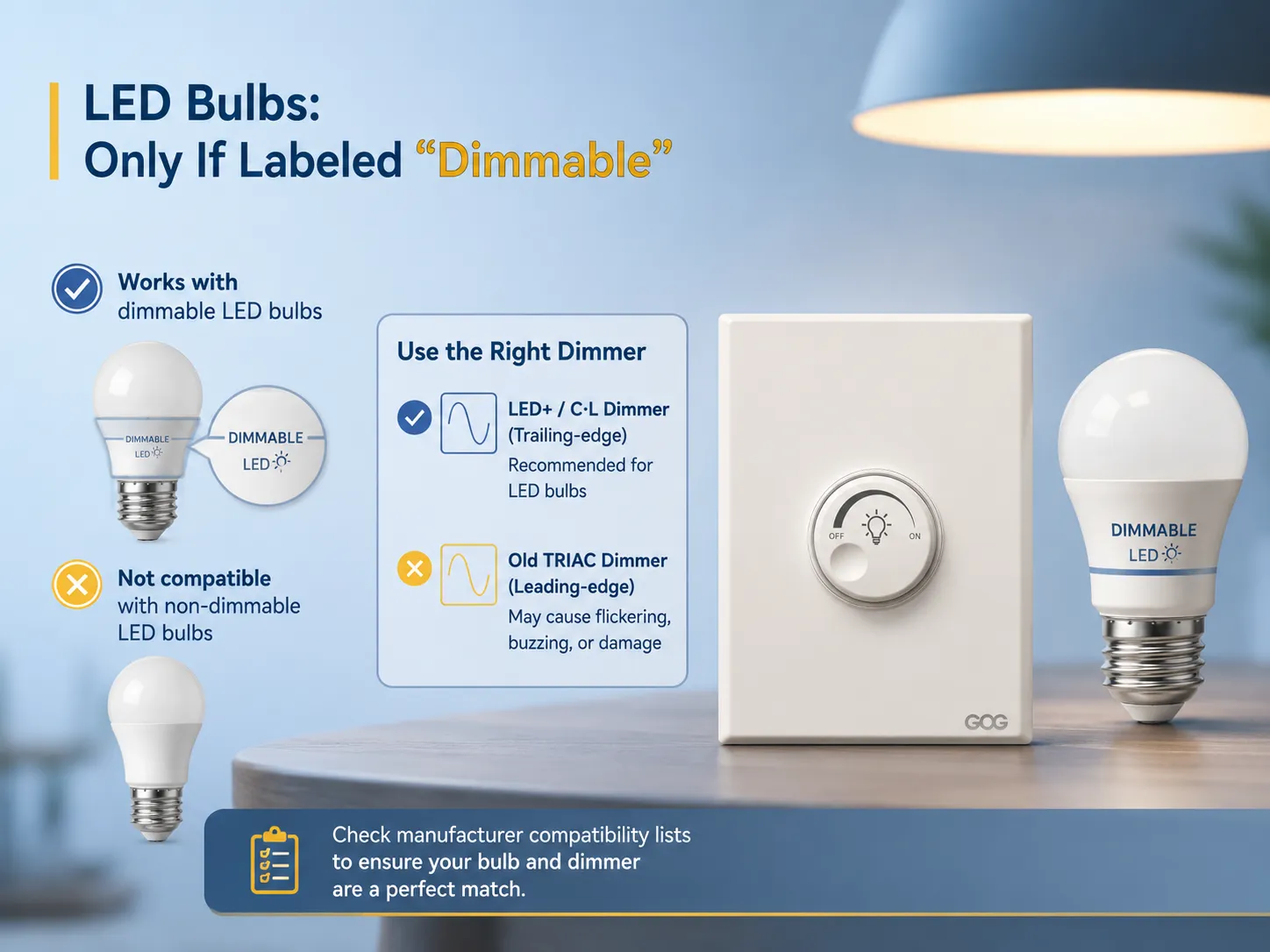
La mayoría de las personas enfrenta desafíos en el proceso. Las bombillas LED no son atenuables por naturaleza. Solo los dispositivos de iluminación marcados como “dimmable” pueden funcionar con dimmers. Usar LED atenuables con dimmers estándar puede causar que la bombilla parpadee e incluso se queme.
Las luces LED atenuables existen, sin embargo, es importante recordar que no todos los dimmers son compatibles con ellas. Los dimmers antiguos basados en TRIAC, también conocidos como dimmers de borde líder, fueron diseñados para alimentar luces incandescentes y no funcionan con el bajo consumo de las bombillas LED. Los dimmers innovadores compatibles con LEDs suelen llamarse dimmers LED+ o dimmers C·L. Para un desglose completo, consulte nuestra guía de compatibilidad de interruptores dimmer para LED.
Philips Lighting y otros fabricantes importantes publican listas de compatibilidad de dimmers para que pueda verificar que una bombilla y un dimmer específicos hayan sido probados juntos. En caso de duda, consulte el sitio web del fabricante antes de comprar. Si ya está buscando el interruptor adecuado, nuestro resumen de mejor interruptor atenuador para luces LED puede ayudarle a reducir sus opciones.
Bombillas CFL: Rara vez Atenuables de Fábrica
Las bombillas fluorescentes compactas ordinarias (CFL) no se pueden atenuar fácilmente. Aunque algunos tipos de CFL son atenuables, están volviéndose raros debido a la creciente aceptación de los LED. Si tienes accesorios para lámparas CFL, también puedes usar bombillas LED ya que son atenuables.
Luminarias de tubos fluorescentes: requieren un balasto regulable
Las luminarias de tubos fluorescentes (T8, T5, T12) pueden ser reguladas, pero solo si se utiliza un balasto electrónico regulable. Por lo general, las luminarias fluorescentes para uso personal vienen con balastos no regulables. Aunque es posible reemplazar el balasto por uno regulable, a menudo este trabajo lo realiza un electricista utilizando una opción de regulación adecuada para sistemas fluorescentes (generalmente regulación 0-10V).
Luminarias LED integradas: verifique el driver
Las luminarias como luces de techo, luces empotradas y luces LED que no permiten cambiar las bombillas se consideran regulables solo si el driver de la lámpara tiene esta función. Para obtener más información sobre esta característica, consulte la especificación del producto o busque “dimmable” en la descripción. Si el driver no permite la regulación, entonces toda la luminaria debe ser reemplazada, ya que un regulador externo no podrá solucionar el problema.
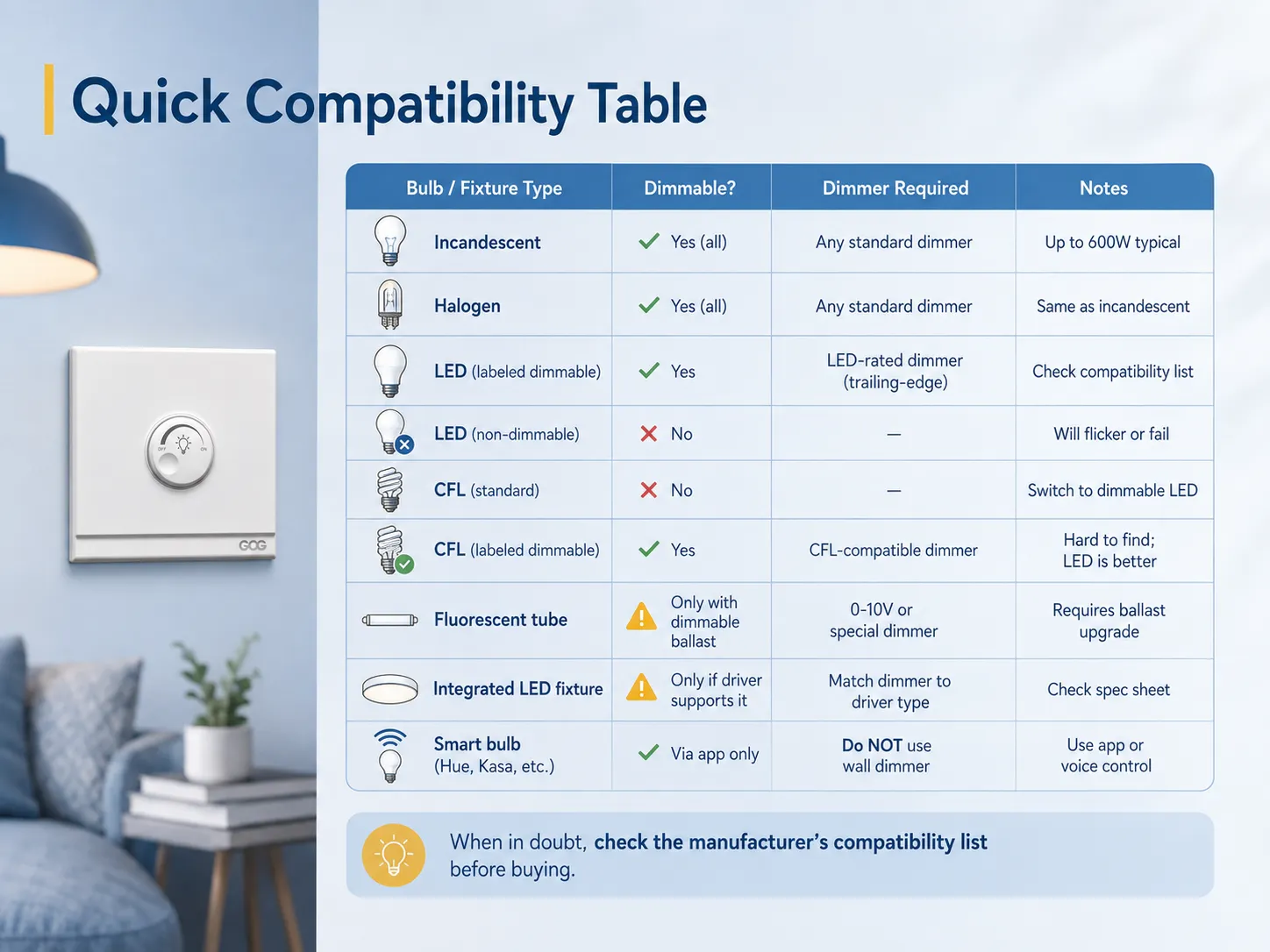
Tabla rápida de compatibilidad
| Tipo de bombilla / luminaria | ¿Regulable? | Regulador requerido | Notes |
|---|---|---|---|
| Incandescente | Sí (todas) | Cualquier regulador estándar | Hasta 600W típico |
| Halógeno | Sí (todas) | Cualquier regulador estándar | Igual que incandescente |
| LED (etiquetado como regulable) | Sí | Regulador para LED (borde de salida) | Ver lista de compatibilidad |
| LED (no regulable) | No | — | Parpadeará o fallará |
| CFL (estándar) | No | — | Cambiar a LED regulable |
| CFL (etiquetado como regulable) | Sí | Regulador compatible con CFL | Difícil de encontrar; LED es mejor |
| Tubo fluorescente | Solo con balasto regulable | Regulador 0-10V o especial | Requiere actualización de balasto |
| Luminaria LED integrada | Solo si el driver lo soporta | Emparejar el dimmer con el tipo de driver | Consultar la hoja de especificaciones |
| Bombilla inteligente (Hue, Kasa, etc.) | Solo vía app | NO usar dimmer de pared | Usar control por app o por voz |
Cuando no se puede instalar un interruptor dimmer
Aunque las bombillas adecuadas puedan estar presentes, hay casos en los que implementar un interruptor dimmer no sería seguro ni práctico. A continuación, se presentan algunas situaciones en las que puede que no desee instalar un interruptor dimmer.
Bajo consumo total en vatios
Muchos dimmers (especialmente los más antiguos) requieren una carga suficiente para permitir un funcionamiento efectivo. Por ejemplo, si se tiene un circuito equipado con solo una o dos pequeñas bombillas LED (como 2x9W), puede que no haya suficiente carga en el dimmer para habilitar su funcionamiento efectivo. Por lo tanto, puede experimentar parpadeo de luces o que las luces se enciendan/apaguen con baja luminosidad.
Los dimmers modernos compatibles con LEDs no presentan este problema ya que tienen cargas más bajas (algunos requieren tan solo 3W), pero aún así se deben verificar las especificaciones. Si su carga es inferior a la requerida, intente agregar bombillas adicionales al circuito o encontrar un dimmer que funcione con cargas LED más bajas.
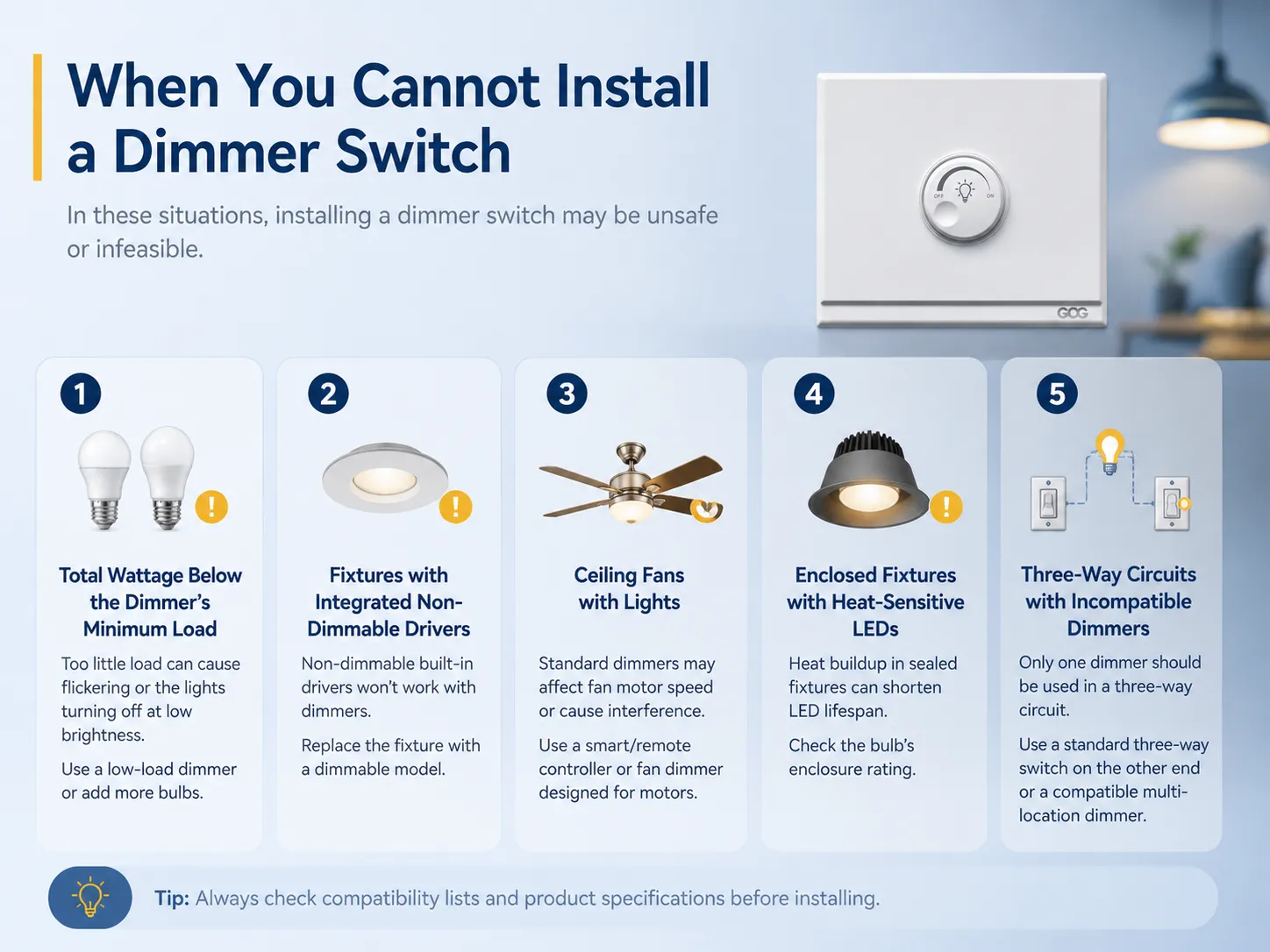
Luminarias con drivers integrados no regulables.
Algunas luminarias, específicamente luces empotradas, luces bajo mostrador y luces de riel, ya están construidas con drivers no regulables. Independientemente del interruptor dimmer que utilice, no podrá atenuar estas luminarias. La única solución es cambiar la luminaria por un modelo regulable propuesto.
Ventiladores de techo con luces.
Los ventiladores de techo con luminarias generalmente no son regulables con dimmers tradicionales. Esto se debe a que los motores del ventilador y las luminarias están interconectados, lo que impide que los interruptores dimmer funcionen correctamente. Si desea atenuar la luz sobre el ventilador, deberá usar un control remoto especial o un dispositivo inteligente para ventiladores que asegure la conexión adecuada de las luces y el ventilador. Si desea cambiar las velocidades del ventilador correctamente, deberá usar un control remoto diseñado específicamente para ventiladores.
Luminarias cerradas con LEDs sensibles al calor.
Algunas bombillas LED han demostrado ser inadecuadas para su uso en luminarias cerradas. Por lo tanto, su uso con dimmers no está prohibido, pero puede agravar el problema de acumulación de temperatura y reducir su vida útil. Es importante verificar la clasificación de la carcasa de la bombilla LED seleccionada antes de utilizarla en una situación conectada a un dimmer.
Circuitos de tres vías con dimmers incompatibles.
Por lo general, es posible tener solo un dimmer instalado en una configuración de tres vías controlada por 2 interruptores. En este caso, el interruptor debe ser un interruptor simple de 3 vías. Sin embargo, si usa 2 dimmers en dicho circuito, puede tener problemas debido a interferencias a menos que utilice dimmers especiales para múltiples ubicaciones, como Lutron Maestro.
Tipos de interruptores dimmer: rotatorio, táctil, deslizante e inteligente
Elegir el estilo de dimmer adecuado no es solo cuestión de apariencia: diferentes tipos ofrecen distintos niveles de control y funcionalidad. Si desea una visión más amplia, nuestra guía sobre tipos de interruptores de luz cubre toda la gama de opciones disponibles.
Reguladores rotativos (perilla)
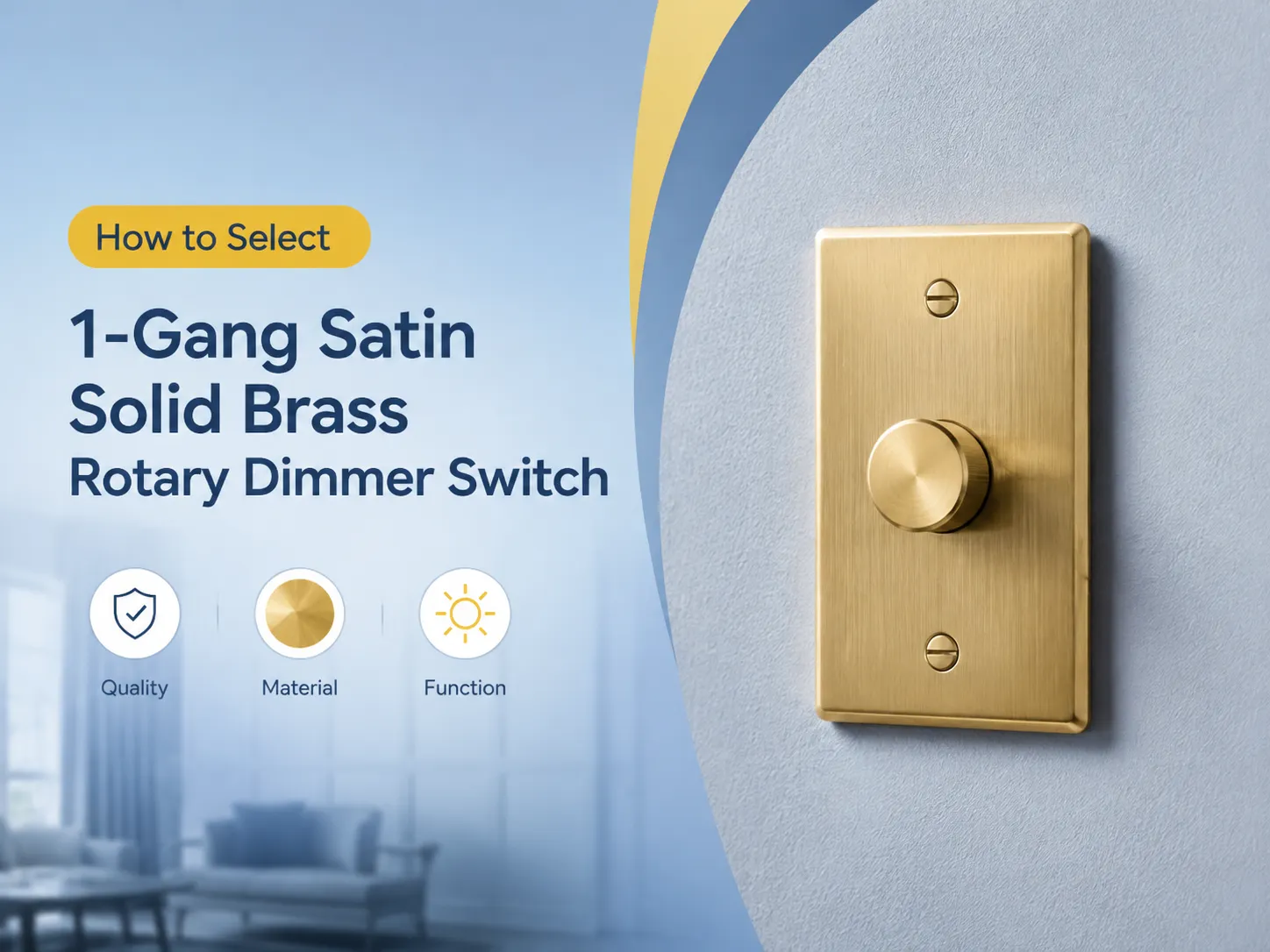
El regulador rotativo tradicional utiliza una perilla giratoria para cambiar el brillo de la iluminación. Este tipo es fácil, confiable y funciona con muchas categorías de bombillas siempre que estén calificadas para LED. Algunos reguladores rotativos tienen una función de pulsar para encender/apagar que permite que la perilla sea el interruptor. Un buen ejemplo es el ELEGRP Digital Rotating Dimmer que puede soportar una carga de 150W LED y 600W incandescente sin necesidad de un cable neutro.
Ideal para usar en dormitorios, comedores y cualquier otro lugar donde se prefiera una operación fácil e intuitiva.
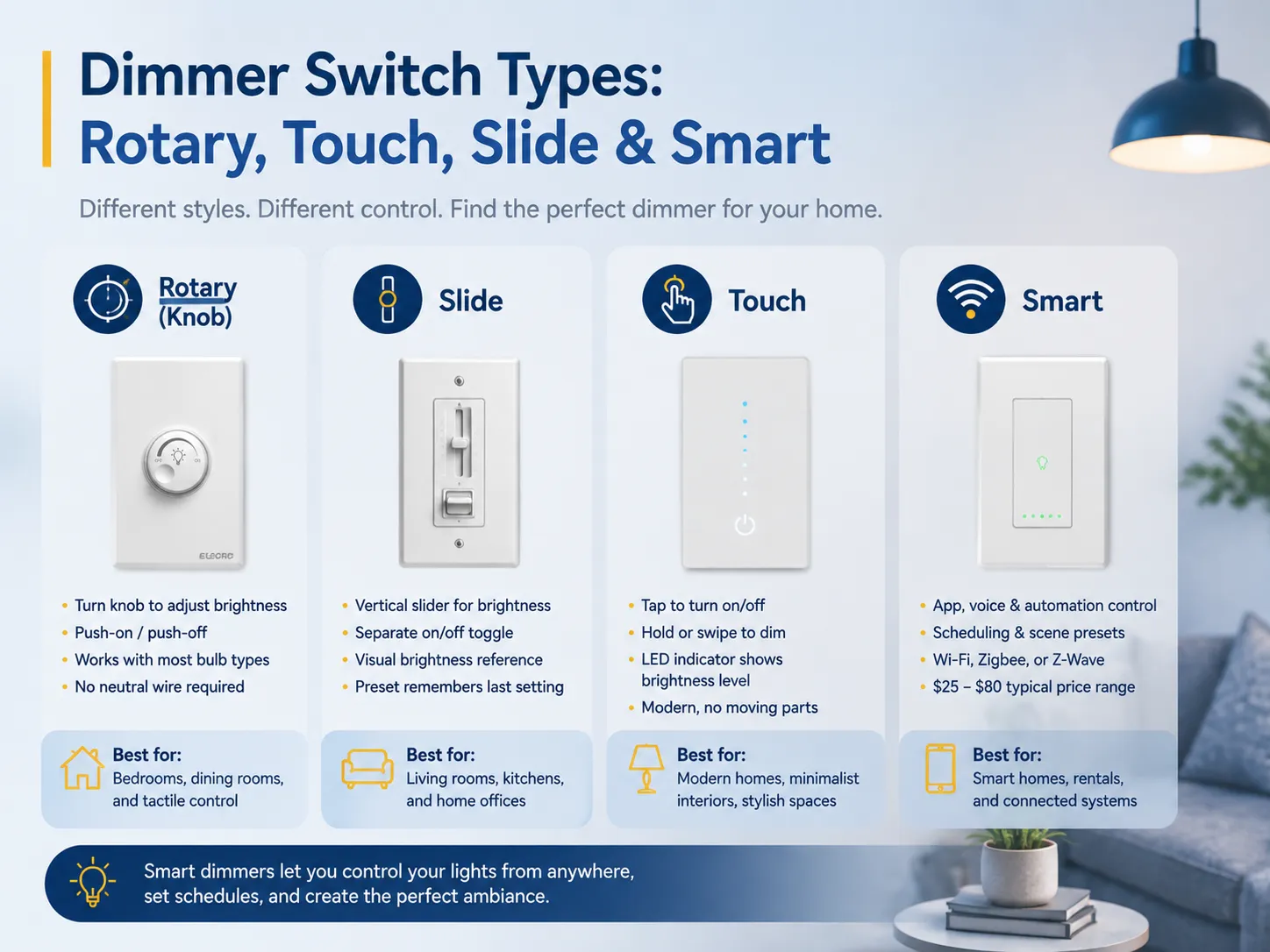
Reguladores deslizantes
Los reguladores controladores utilizan un deslizador hacia arriba y hacia abajo para regular el brillo, mientras que se combinan con un interruptor adicional de palanca para encender/apagar las luces. La operación es sencilla y da un enfoque dramático a la medida del brillo. Una variedad de modelos viene con preajustes requeridos que mantienen las configuraciones.
Mejor para: Lugares como salas de estar, cocinas y oficinas en casa donde la iluminación cambia con frecuencia.
Reguladores táctiles
Los reguladores táctiles son un paso adelante respecto a los reguladores deslizantes gracias a un aspecto moderno y la ausencia de componentes móviles. Se presiona el botón para encender/apagar y se mantiene presionado para ajustar los niveles de brillo. Con muchos modelos que cuentan con indicadores de ajuste de luz, los reguladores táctiles tienen una popularidad creciente en interiores modernos.
Mejor para: Hogares elegantes, interiores minimalistas y cualquier lugar donde la estética sea clave.
Reguladores inteligentes
Los reguladores inteligentes están conectados a su red doméstica mediante tecnología Wi-Fi, Zigbee o Z-Wave y pueden controlarse usando la aplicación de su smartphone, asistente de voz o automatización. Algunos de los reguladores inteligentes más comunes son Lutron Caséta, TP-Link Kasa y Leviton Decora Smart. El costo de estos reguladores inteligentes varía desde $25 hasta $80, dependiendo de la funcionalidad que proporcionen. Para más opciones de productos, consulte nuestro resumen de los mejores reguladores seleccionados en todas las categorías.
Beneficio principal: La ventaja de los reguladores inteligentes es que puede atenuar una luz sin tener que estar en el interruptor. Pueden programarse para encenderse automáticamente a una hora determinada (ejemplo: las luces pueden configurarse para encenderse gradualmente a las 7 AM en el dormitorio).
Mejor para: Hogares con tecnología inteligente, apartamentos donde se desea controlar las luces de forma remota y quienes están creando un sistema de iluminación conectado.
| Tipo de Dimmer | Rango de precios | Característica clave | Mejor Para |
|---|---|---|---|
| Rotativo (perilla) | $10–$25 | Control simple y táctil | Dormitorios, comedores |
| Deslizante | $15–$35 | Referencia visual de brillo | Salas de estar, cocinas |
| Táctil | $20–$45 | Elegante, sin partes móviles | Interiores modernos |
| Inteligente (Wi-Fi/Zigbee) | $25–$80 | Control por aplicación + voz | Hogares inteligentes, automatización |
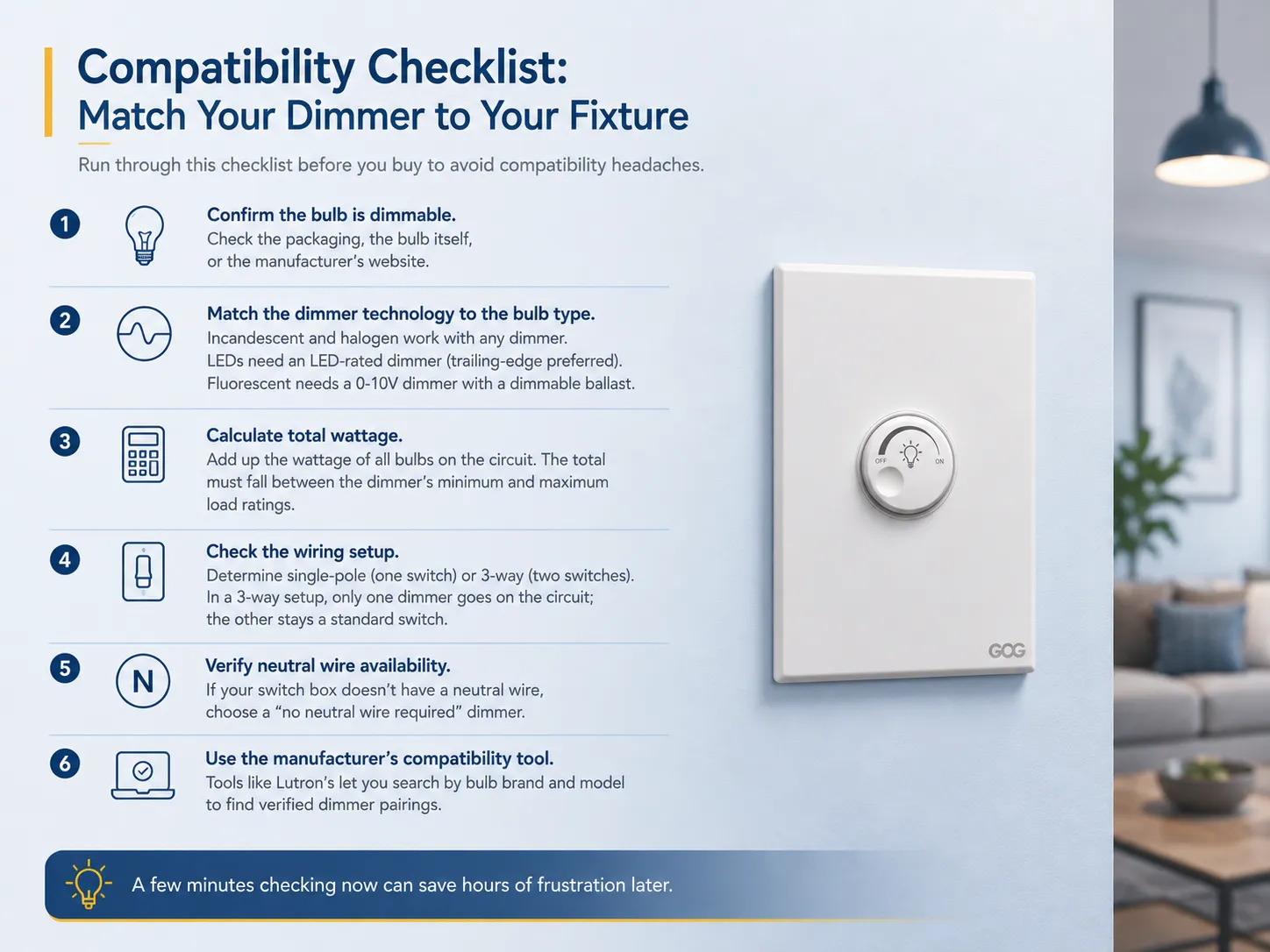
Lista de verificación de compatibilidad: Empareje su regulador con su luminaria
Antes de comprar un interruptor regulador, revise esta lista para evitar problemas de compatibilidad.
Asegúrese de que la bombilla sea apta para atenuar. Consulte la información del paquete, la bombilla misma o la página web del fabricante. Si ninguno de estos indica que es regulable, puede asumir que no lo será.
Use tecnología de regulación adecuada para el tipo de bombilla. Puede usar cualquier tipo de dispositivo regulador con bombillas incandescentes o halógenas tradicionales. Sin embargo, para bombillas LED necesitará un regulador para bombillas LED (preferiblemente reguladores de tipo trailing-edge), mientras que para bombillas fluorescentes necesita un regulador 0-10V compatible con un balasto regulable.
Encuentre la potencia total. Calcule la potencia para todo el circuito sumando la potencia de todas las bombillas. El total debe estar dentro del rango de la carga mínima y máxima del regulador. Por ejemplo, si tiene 6 LEDs regulables de nueve vatios que suman un total de 54 vatios, necesitará un regulador clasificado para 54 vatios para LEDs, y esto no debería ser un problema, ya que la mayoría de los dispositivos reguladores LED tienen una clasificación máxima de carga de 150 vatios.
Verifique cómo está cableado el circuito eléctrico. Verifique si el circuito es unipolar o de 3 vías, y compre el hardware de regulación clasificado para la configuración correcta. En caso de una instalación de 3 vías, solo habrá un regulador por circuito, mientras que el otro interruptor permanece como un interruptor estándar.
Confirme si hay un cable neutro disponible. Muchas instalaciones antiguas no tienen un cable neutro disponible en la caja del interruptor, y en este caso, sería conveniente comprar un regulador sin cable neutro. La mayoría de los reguladores LED contemporáneos creados por fabricantes como Lutron, Leviton, ELEGRP, etc., tienen esa opción.
Use una herramienta de compatibilidad proporcionada por el fabricante. Lutron ofrece una herramienta de compatibilidad que se puede usar para buscar por tipo y marca de bombilla para encontrar los reguladores adecuados. Esta sería la forma más segura de asegurar que la elección sea correcta.
Opciones de actualización: Hacer que una luz no regulable sea regulable
Si su configuración actual no admite regulación, tiene varias opciones de actualización según su presupuesto y comodidad técnica.
Opción 1: Cambiar las bombillas
La actualización más fácil y económica. Reemplace bombillas LED o CFL ordinarias por bombillas LED regulables (que cuestan alrededor de $2-$8 cada una) e instale un interruptor regulador compatible con la bombilla LED ($15-$35). Costo total por luminaria: menos de $45. Esto se puede hacer para cualquier luminaria ordinaria que tenga bombillas removibles. Si ya tiene un regulador pero necesita reemplazar un interruptor regulador antiguo, el proceso es sencillo.
Opción 2: Usar un regulador de lámpara enchufable
La opción más sencilla para atenuar lámparas de cualquier tipo es un atenuador enchufable que conecta el enchufe de la lámpara a la toma de corriente sin necesidad de cableado complicado. El modelo de atenuador enchufable Leviton TBL03-10W es capaz de atenuar hasta 300W en lámparas incandescentes y 150W en bombillas LED regulables, y la instalación es fácil y toma solo unos segundos. Solo asegúrese de que su lámpara tenga una bombilla regulable.
Opción 3: Instalar un sistema de bombillas inteligentes
Si busca opciones de iluminación regulable que no requieran un interruptor en la pared, las bombillas inteligentes son la solución. Productos como las bombillas inteligentes TP-Link Kasa ofrecen funciones de atenuación que van desde 1% hasta 100% mediante una aplicación para smartphone o asistente de voz. No es necesario un interruptor regulador ya que las bombillas inteligentes se conectan directamente al Wi-Fi (TP-Link no necesita un hub a diferencia de las bombillas Philips Hue Smart, que requieren un puente Hue). La empresa afirma un ahorro energético de aproximadamente 80% en comparación con la bombilla incandescente común de 60W.
Recuerde que no es recomendable combinar bombillas inteligentes con ningún atenuador de pared, ya que la atenuación la realiza la electrónica interna de la bombilla.
Opción 4: Reemplazar el accesorio
Con accesorios LED integrados que tienen drivers no regulables, la única opción disponible es reemplazar el accesorio por completo con uno que tenga un driver regulable. Este proceso puede ser bastante costoso (rango de $50 a $250 o incluso más por accesorio) y también puede requerir contratar a un electricista; sin embargo, este es el único método que puede añadir capacidades de atenuación a un panel LED sellado o una luz empotrada que contiene un driver incorporado.
Opción 5: Actualizar el balasto (fluorescente)
Si utiliza tubos fluorescentes, puede cambiar el balasto regular por uno regulable y usar un atenuador compatible 0-10V. Este es un proceso complejo que necesita un electricista para completarlo, pero le brinda control total sobre la atenuación de los tubos fluorescentes en su garaje, taller o estación de trabajo.
¿Son buenos los interruptores reguladores para configuraciones de hogares inteligentes?
Sí — los interruptores reguladores son una de las mejoras de mayor impacto que puede hacer en un hogar inteligente. Aquí está el porqué. Si está construyendo un hogar conectado desde cero, explorar opciones de un fabricante dedicado de interruptores inteligentes puede darle una ventaja en hardware compatible.
Integración con control por voz
Los atenuadores inteligentes de marcas como Lutron, TP-Link y Leviton pueden usarse junto con Amazon Alexa, Apple HomeKit y Google Assistant. Solo con pedir que ‘configure la luz de la sala a 40%’, las luces se ajustarán instantáneamente sin necesidad de usar ninguna aplicación o interruptor.
Horarios y escenas automatizadas
Las aplicaciones de atenuadores inteligentes permiten al usuario establecer horarios (por ejemplo, las luces pueden volverse brillantes al amanecer y atenuarse a las 10 PM) y escenas (por ejemplo, una configuración “Noche de película” puede atenuar todas las luces de la sala a 15%). Según los datos del producto TP-Link, si se programa la atenuación de la luz, puede haber un ahorro de hasta 80% en el consumo de energía en comparación con el uso continuo de luces incandescentes.
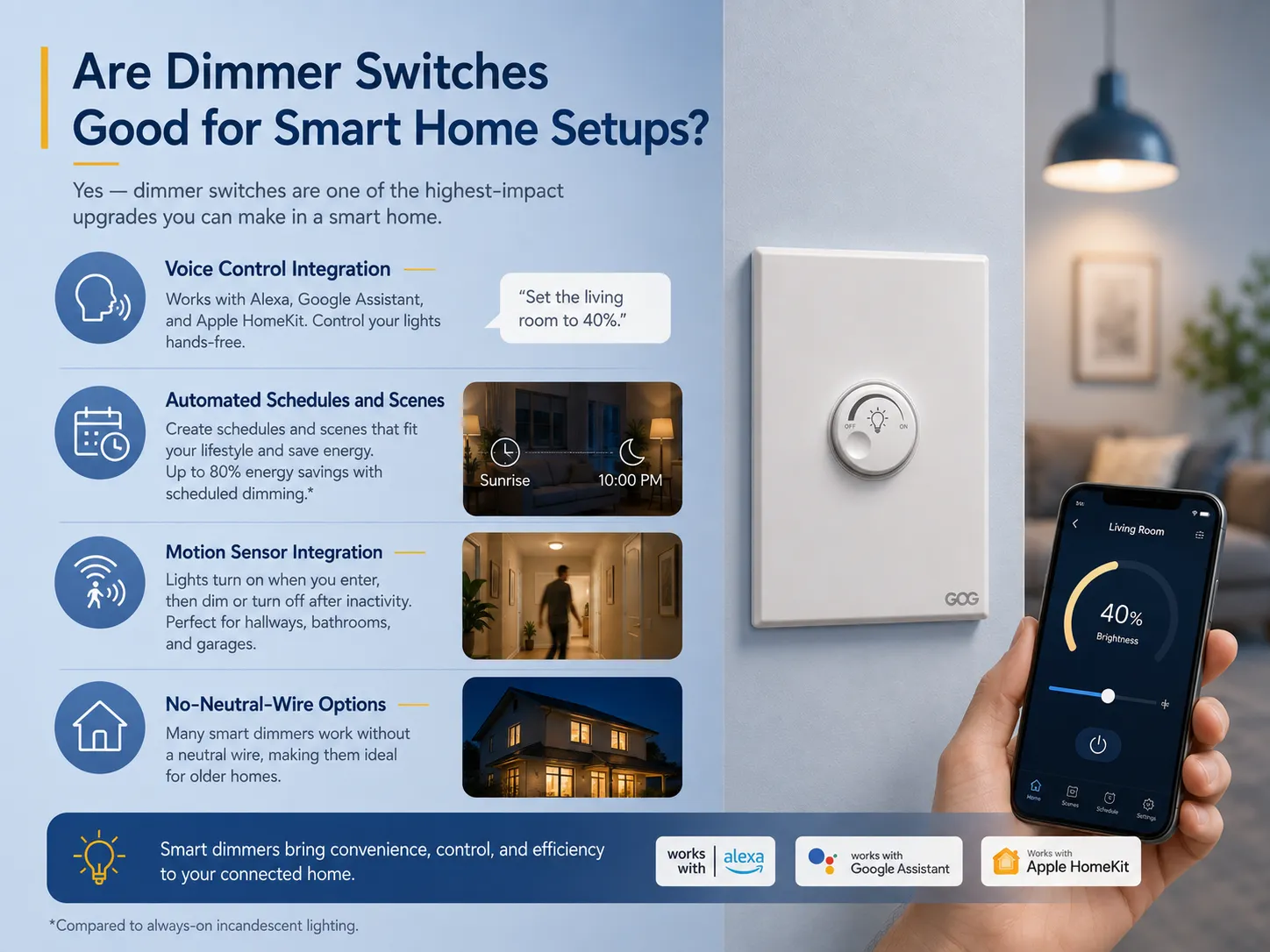
Integración con sensor de movimiento
Algunos atenuadores inteligentes vienen con sensores de movimiento integrados o pueden combinarse con sensores adicionales. Cuando alguien entra en la habitación, las luces se encienden, alcanzando un cierto nivel de brillo, y se atenuarán o apagarán después de un tiempo sin uso.
Opciones sin cable neutro
Varios atenuadores inteligentes (como Lutron Caséta y la serie TP-Link Kasa) funcionan sin necesidad de cables neutros, lo que permite que se usen en viviendas antiguas que no cuentan con cables neutros en la caja del interruptor. Esto los hace mucho mejores que los interruptores inteligentes convencionales que requieren cableado neutro.
Compatibilidad con plataformas
| Plataforma | Marcas de atenuadores compatibles |
|---|---|
| Amazon Alexa | Lutron Caséta, TP-Link Kasa, Leviton, GE |
| Asistente de Google | Lutron Caséta, TP-Link Kasa, Leviton |
| Apple HomeKit | Lutron Caséta, Eve, Leviton Decora Smart |
| Samsung SmartThings | TP-Link Kasa, Leviton, Zooz |
| Matter (multiplataforma) | Lutron Caséta (a través del hub), TP-Link Tapo |
Sin embargo, debe tenerse en cuenta que los atenuadores inteligentes necesitan un hub o una conexión Wi-Fi para funcionar correctamente. Por lo tanto, en caso de desconexión de internet, el dispositivo no funcionará a menos que opte por una versión que tenga capacidades de control local (por ejemplo, Lutron Caséta utiliza radio Clear Connect que no depende del Wi-Fi).
Mejores Habitaciones y Aplicaciones para Interruptores Atenuadores
El interruptor atenuador es una característica esencial en habitaciones donde los requisitos de iluminación cambian drásticamente en diferentes momentos del día. Estas son algunas habitaciones donde los atenuadores resultan más útiles.
Sala de estar: Se puede aumentar el brillo para actividades como leer o limpiar y disminuirlo para relajarse o ver películas. La sala de estar es el lugar más común para los atenuadores.
Dormitorio: La reducción gradual del brillo por la noche es buena para la higiene del sueño. Los interruptores atenuadores inteligentes pueden crear simuladores de amanecer para despertar de forma natural.
Comedor: La capacidad de crear un ambiente particular hace que ocasiones como cenar con amigos sean más agradables. El atenuador permite pasar del 100% al 50% de brillo en poco tiempo.
Cocina: Brillante durante la preparación de comidas y atenuado durante bocadillos nocturnos. Es especialmente útil cuando se integra con LEDs bajo los gabinetes.
Oficina en casa: Puede ayudar a reducir el deslumbramiento de la pantalla para videollamadas mientras permite suficiente luz para trabajar cómodamente.
Baño: Luz suave para viajes nocturnos al baño sin que el brillo total te despierte.
Cine en casa: La iluminación juega un papel muy importante para lograr la atmósfera deseada.
Errores comunes a evitar
- Uso de tipos de bombillas incorrectos en el mismo circuito de atenuación. Diferentes tipos de bombillas tienen diferentes propiedades eléctricas. Mezclarlas en un mismo circuito puede resultar en parpadeos e atenuación inconsistente. Según las directrices de Lutron, algunos atenuadores pueden funcionar con ese tipo de carga, pero es mejor ceñirse al mismo tipo.
- No considerar el requisito de carga mínima. Si la potencia del LED es menor que la requerida (por ejemplo, tiene una bombilla de 7W en un atenuador que necesita al menos 10W), el atenuador no funcionará correctamente. Verifique las especificaciones al principio.
- Uso de una bombilla inteligente con un atenuador de pared. Las bombillas inteligentes (como Philips Hue, TP-Link Kasa, Wyze) tienen su propio mecanismo interno de atenuación. Si las usa con un atenuador de pared, causará una doble atenuación de la bombilla (lo que puede provocar parpadeos, zumbidos e incluso quemar la bombilla).
- Sobrecarga del atenuador. Colocar muchas bombillas en un circuito de atenuador puede causar incendio. Por ejemplo, un atenuador de 600W puede soportar 10 bombillas de 60W, pero si cambia a LEDs de 9W, funcionará bien. Los problemas de sobrecarga suelen surgir cuando la persona intenta cambiar de LEDs a bombillas incandescentes de mayor potencia.
- No verificar la compatibilidad. Asegúrese siempre de que las bombillas y los atenuadores que planea usar juntos sean compatibles. La mayoría de las grandes empresas (Lutron, Leviton) proporcionan esta información en sus páginas web.
Preguntas frecuentes
¿Cuál será el resultado si se instala una luz no regulable con un interruptor atenuador?
En ese caso, la luz normalmente parpadeará, emitirá un zumbido o se apagará sin advertencia. Con el tiempo, la forma de onda creada por el atenuador puede dañar los componentes internos de la bombilla, lo que provocará fallos más rápidos en el futuro. También existe una pequeña posibilidad de que el atenuador se sobrecaliente. En caso de que aparezca alguno de estos síntomas, debe dejar de usar el interruptor atenuador y reemplazar la bombilla por una alternativa regulable.
¿Cuáles son las formas de determinar si una luminaria en particular es capaz de ser regulada?
Asegúrese de que el embalaje, la base de la bombilla o la información del producto en la luminaria mencionen su naturaleza regulable. Si no hay menciones sobre la función regulable, busque el número de modelo en el sitio web oficial del fabricante y verifique si indica si la luz admite regulación. Si es una luz integrada, las especificaciones deben mencionar si el componente interno es capaz de regularse. Si no puede encontrar ninguna confirmación, asuma que no es compatible con atenuadores.
¿Se pueden usar interruptores atenuadores en luces estándar?
Sí, se pueden usar, pero solo si la bombilla instalada es regulable. Las lámparas incandescentes y halógenas siempre entran en la categoría regulable, por lo que cualquier luz estándar con este tipo de bombilla puede usarse con un interruptor atenuador. Las luminarias LED pueden tener lámparas etiquetadas como regulables y los interruptores atenuadores diseñados para usarse con luces LED se deben combinar. La capacidad de regulación la determina la bombilla o el controlador incorporado, no la luminaria en sí.
¿Cómo saber si un interruptor puede ser reemplazado por un atenuador?
Se deben verificar tres puntos. Primero, si la bombilla está marcada como regulable; segundo, si la potencia del circuito está dentro de los límites definidos por el atenuador; y tercero, si el esquema de cableado utilizado es compatible con el atenuador. Si se cumplen todas estas condiciones, la instalación es posible. Si es una luminaria integrada, no debe olvidarse del controlador.
Un interruptor atenuador es una de las mejoras más prácticas que puede hacer en la iluminación de su hogar, pero solo cuando la combinación entre atenuador, bombilla y luminaria es correcta. Las bombillas incandescentes y halógenas son universalmente compatibles. Los LED funcionan perfectamente con atenuadores, pero solo cuando la bombilla está etiquetada como regulable y se combina con un interruptor clasificado para LED. Los CFL, tubos fluorescentes y luminarias integradas tienen requisitos específicos que deben verificarse cuidadosamente antes de la instalación.
En caso de que su iluminación actual no tenga funciones regulables, la solución más económica sería el intercambio de las bombillas no regulables por LEDs e instalar un dimmer, ya que generalmente cuesta menos que $45. Para los usuarios que deseen tener más funciones que solo un dimmer, existen dimmers inteligentes producidos por empresas como Lutron, TP-Link y Leviton que cuentan con características adicionales que permiten controlar las luces mediante la voz, programar su funcionamiento e incluso automatizar la iluminación, sin necesidad de un cable neutro. Una vez que esté listo para comprar nuevos dispositivos, debe considerar los numerosos tipos de interruptores disponibles y elegir los dimmers, enchufes e interruptores adecuados para sus instalaciones. GOG Electric es el proveedor de una gran variedad de dimmers, interruptores y controles inteligentes producidos conforme a todas las normas internacionales de seguridad.