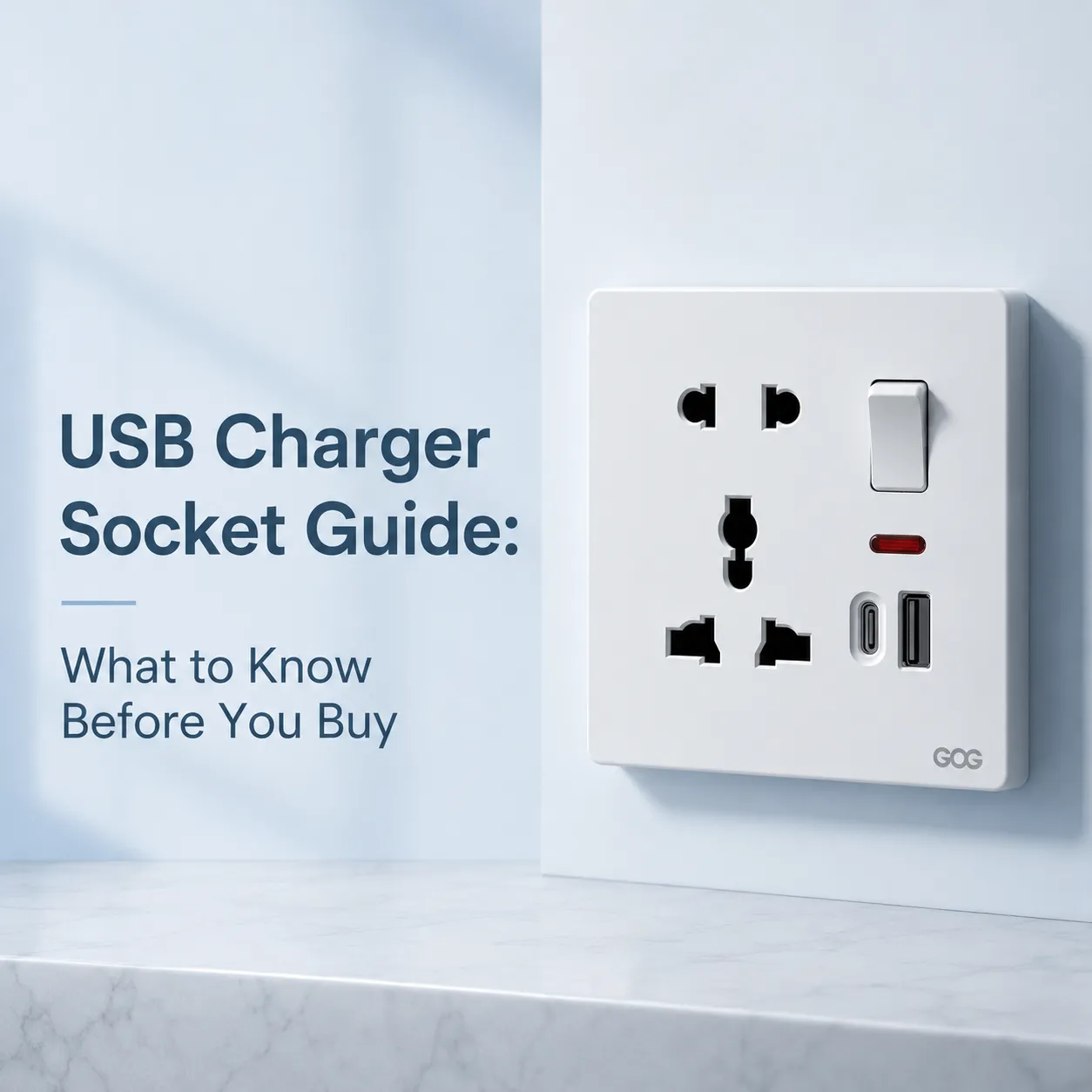
A woman in Seattle had just completed a kitchen remodel last month and wanted to prevent any excess clutter on her countertops. She was not interested in having large bulky chargers or cords strewn all over her backsplash. The electrician suggested converting the old outlet into an USB socket outlet that would plug directly into the wall. However, the homeowner was hesitant due to the uncertainty of safety, charging speed compared to the original charger included with her phone, and if they would quickly become outdated due to changing USB standards.
The question about power plugs with USB ports being a standard option rather than a novelty has been asked on every job site and at every electrical wholesale counter. The fact is that USB plugs and receptacles (outlets) are completely different than a standard duplex outlet, as they contain power supplies that convert 120 volts of AC wall power to the lower voltage of DC for use by USB devices: thus, the circuit that converts AC voltage to DC voltage operates 24 hours a day and generates heat and has a small current draw when the receptacle is not providing power to a device. This internal electrical package will ultimately define the difference between a smart upgrade and a service call in the future, therefore it is important to understand how this internal electrical package could affect how the installation is performed, how it will function, and how safe it is to use.
How a USB Wall Outlet Differs from a Standard Socket
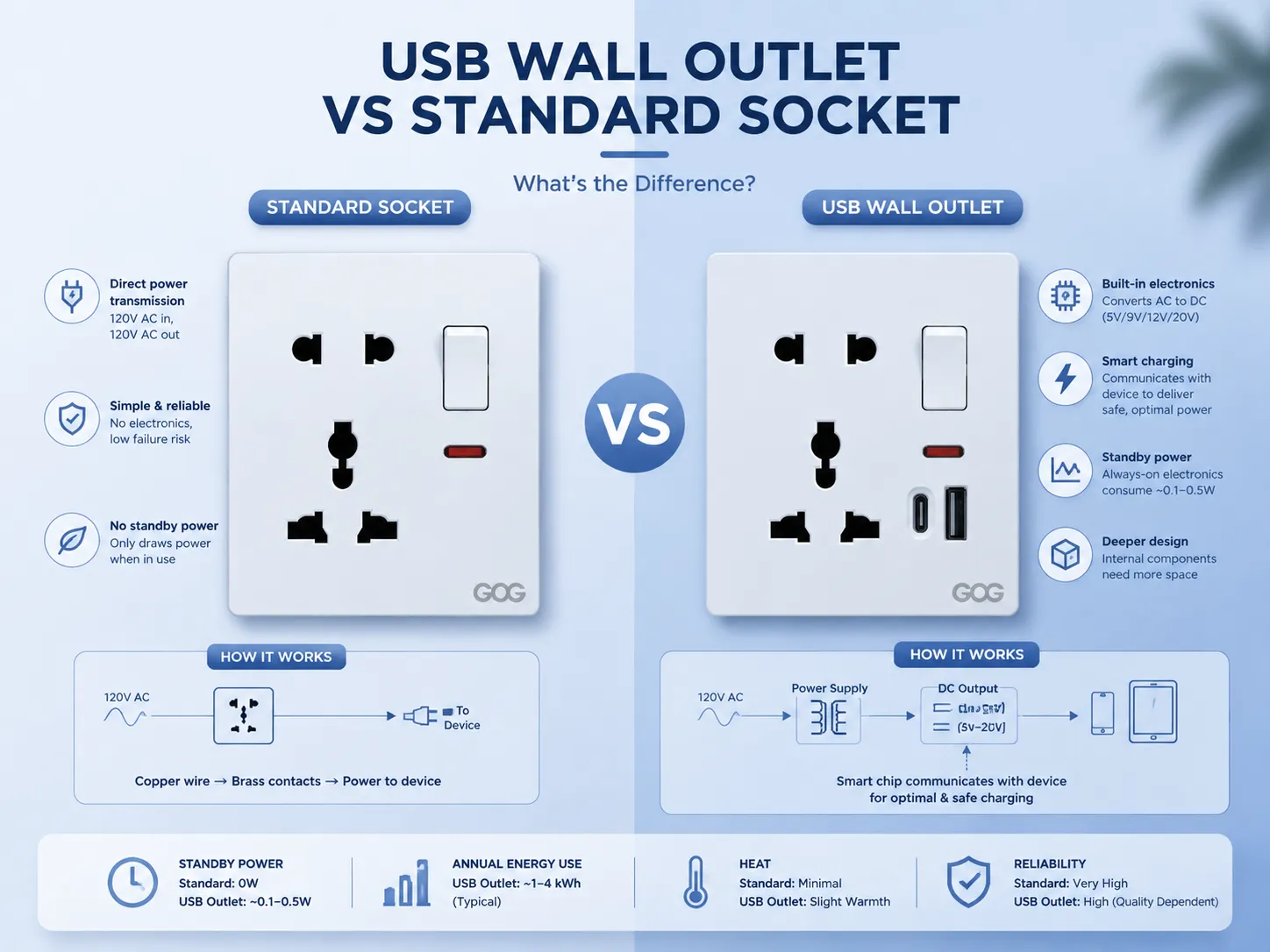
A standard wall outlet is essentially just a mode of transmitting electricity, that’s how it works. The outlet takes the copper wire (the power feed) coming into the building and connects it to the brass connectors that hold onto the plug. That’s it! There is no electronic circuits, no heat produced beyond what the load connected draws, and only one mechanical device that can fail (the tension in the springs that hold onto the plug).
A USB charger is an active electrical component contained in a wall receptacle. The inside of the plastic shell contains a small transformer (or switched-mode supply) that takes the incoming 120V of alternating current from your wall and converts it into 5V (for Type A connection) or as little as 0 V or as much as 20 V (for Type C) of direct current, depending on what you connect to it. Additionally, the charger is capable of communicating with the device it is powering, enabling it to let the device know how much amperage it may safely draw.
The internal electronics package is always consuming power, constantly, no matter what is plugged into the USB ports. Even if nothing is connected at all to the USB ports, the power supply will still drawing a small amount of standby current, typically in the range of 0.1 to 0.5 watts. Over the course of a year, that amount of standby power used would equal to approximately 1 to 4 kilowatt‑hours, which is not enough to significantly impact your household electric bill but still is an indicator that your outlet is constantly powered and warm. The space that this electronics package takes up in the box is the reason that USB receptacles are deeper than standard, non‑USB, receptacles for the installation of USB receptacles into shallow, old work, boxes may be very close on space. In some cases, the box will need to be replaced in order to provide enough space for the installation of wiring.
Are Outlets with USB Actually Worth the Investment?
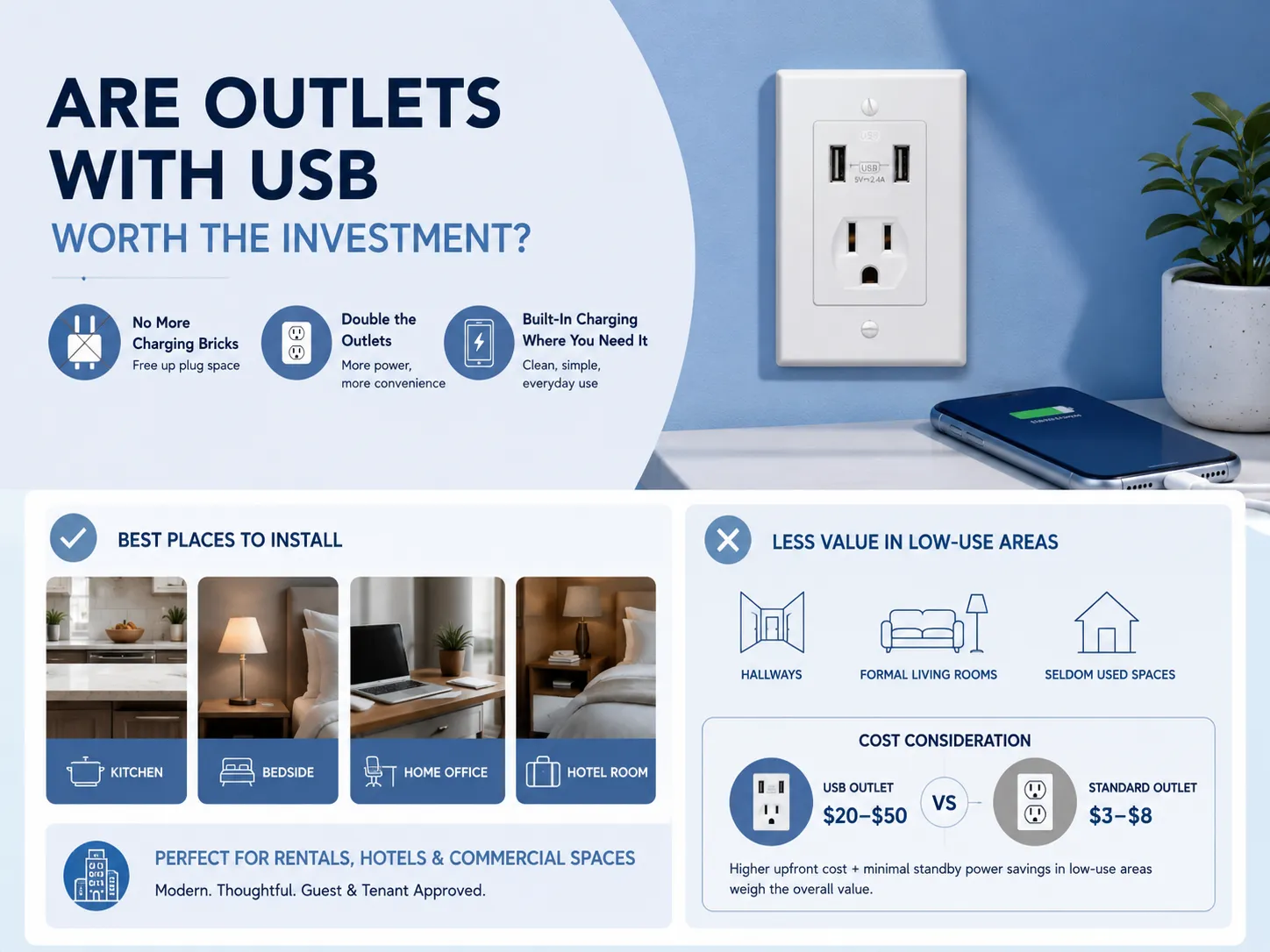
The worth of a USB outlet comes from the location of its installation and what it is used for. An example would be; a Kitchen, Bed side table, home office desk, or hotel nightstand, which are all places that charge a phone or tablet everyday and where visible charging bricks and cables are not desired. Therefore, the benefit is immediate and will last. When a USB wall outlet is installed, it removes the need for a charging adapter (which uses one of the two plug slots), and doubles the amount of available power outlets in that location.
A USB outlet offers minimal added value in non-charging locations such as hallways, formal living rooms, or locations where devices are seldom charged, compared to a normal outlet. The small amount of standby power consumed continuously by the device’s use is very small but accumulates over the entire period of time that the device is in use. Likewise, the increased cost of a good quality USB outlet, with a price range from $20 to $50, must also be weighed against a normal tamper-resistant duplex outlet with a price range from$3 to $8, making the justification for installing a USB outlet, in these applications, questionable at best.
For rental properties, hotels, and commercial spaces, USB outlets offer a clear competitive advantage. They signal that the space has been updated to meet the expectations of guests and tenants who travel with multiple devices and limited time to charge them. For a broader look at how receptacles fit into a complete modern electrical scheme, our overview of the best electrical outlets and switches for modern homes covers the full range of options from basic to smart‑integrated.
USB‑A vs. USB‑C on Wall Outlets: What the Port Type Means
USB port types will affect compatibility, charging speed, and lifespan of sockets as technology continues to advance.
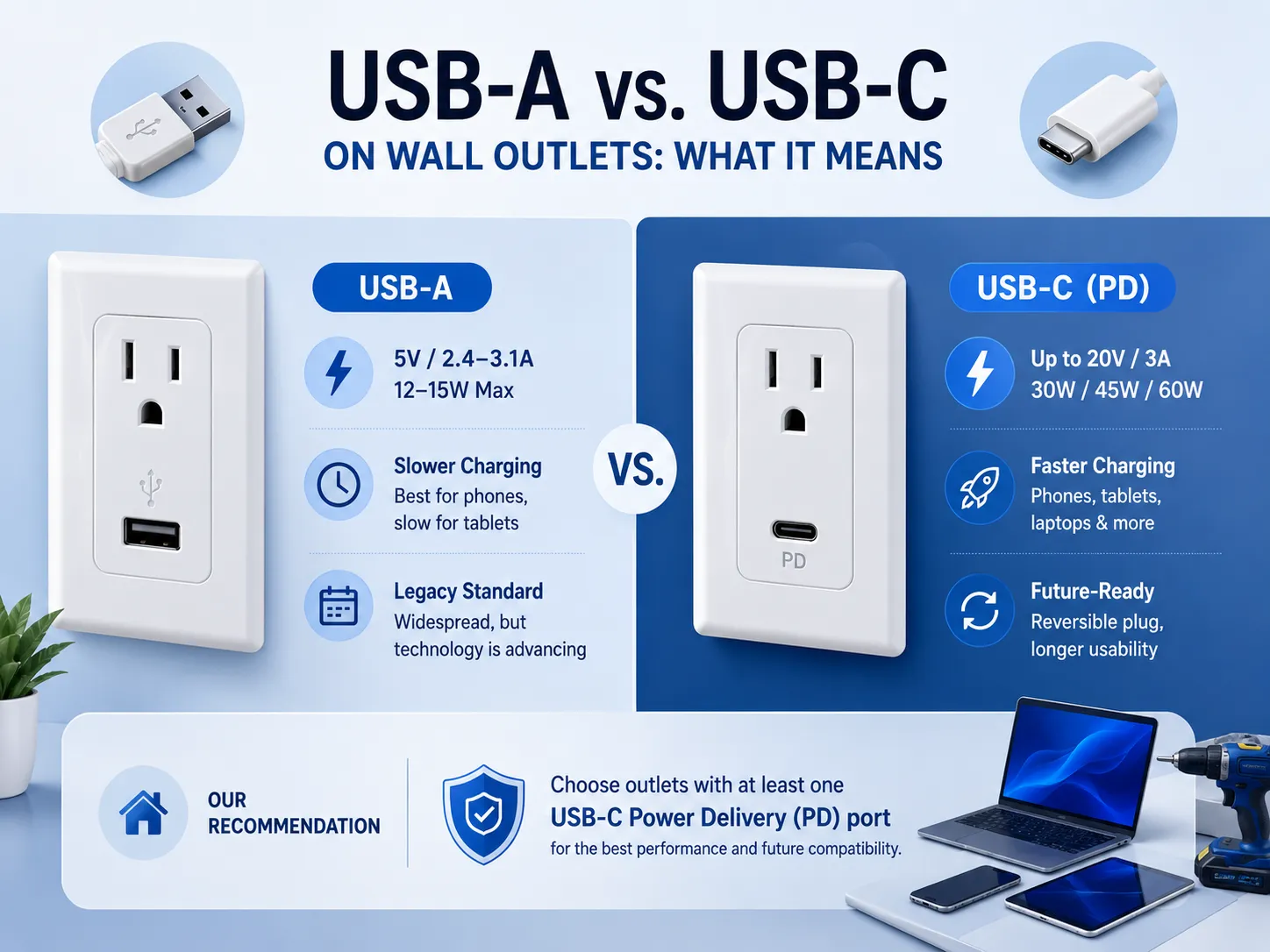
USB‑A ports For over two decades USB-A has continued to be one of the most commonly used connections; all wall chargers to charge devices have supplied 5-volt, 2.4/3.1 Amp maximum charge to the outlet for potential output power of 12-15 watts per outlet. AS such, charging a phone will take a good amount of time (not the best), charging a tablet will be very slow using this type of connection. Old school? Yes! However there is an increasing amount of US manufacturers that are using USB-C ports versus USB-A ports going forward.
USB‑C ports with Power Delivery (PD) Using the USB-C PD wall outlet creates the fastest way to charge all your electronics through an AC electrical outlet and USB cable. By connecting your device through its USB type C connector, the wall outlet can negotiate a maximum electric current of up to 3 amps and 20 volts with the connected equipment. With this amount of electric current, the wall outlet can charge a total of 30 watts, 45 watts, or 60 watts for a total charge time (depending on the power source). These amounts of power will allow you to charge a smartphone at full speed, and also charge tablets, laptop computers, and some electric hand tools as well. Plus, because the USB-C plug is reversible, you will no longer have to worry about trying to insert a standard USB (type A) plug into the outlet incorrectly!
A current generation USB port offers multiple combinations of connectors into one connector style. In terms of the two newer types of charging, Quick Charge Systems work with older USB connectors (e.g., original USB A), and both types of chargers will work with the new “fast charging” systems available at the regular wall outlet or through other electronic devices using an existing type or new type of USB connector. Therefore, if you plan to live in your home for an extended length of time, it is advisable to select the model that has at least one USB-C Power Delivery (PD) port, as this port will provide you with the most extended period of usability before any of the devices will become obsolete.
Are USB Plugs Being Phased Out?
While there will still be a USB connection on the wall outlet, the previous connection (USB-A), will now be changed to the more widely used, standard connection (USB-C) as more devices adopt the new common charger for most of your electronics (as part of the European Union’s Common Charger Directive, which requires all new products sold with chargers to use USB-C). This will include many different types of products, including cell phones, tablets, headphones, and many others.
Today, a wall outlet with a USB-A port is not redundant. There will continue to be billions of devices that are compatible with this type of outlet for years to come. A wall outlet with both USB-A and USB-C ports will provide the ability to charge from the two different protocols and give flexibility that only using one protocol can’t provide. USB-A is still widely used, and will continue to be, but it is likely to be augmented with the addition of USB-C.
Safety Considerations for USB‑Integrated Receptacles
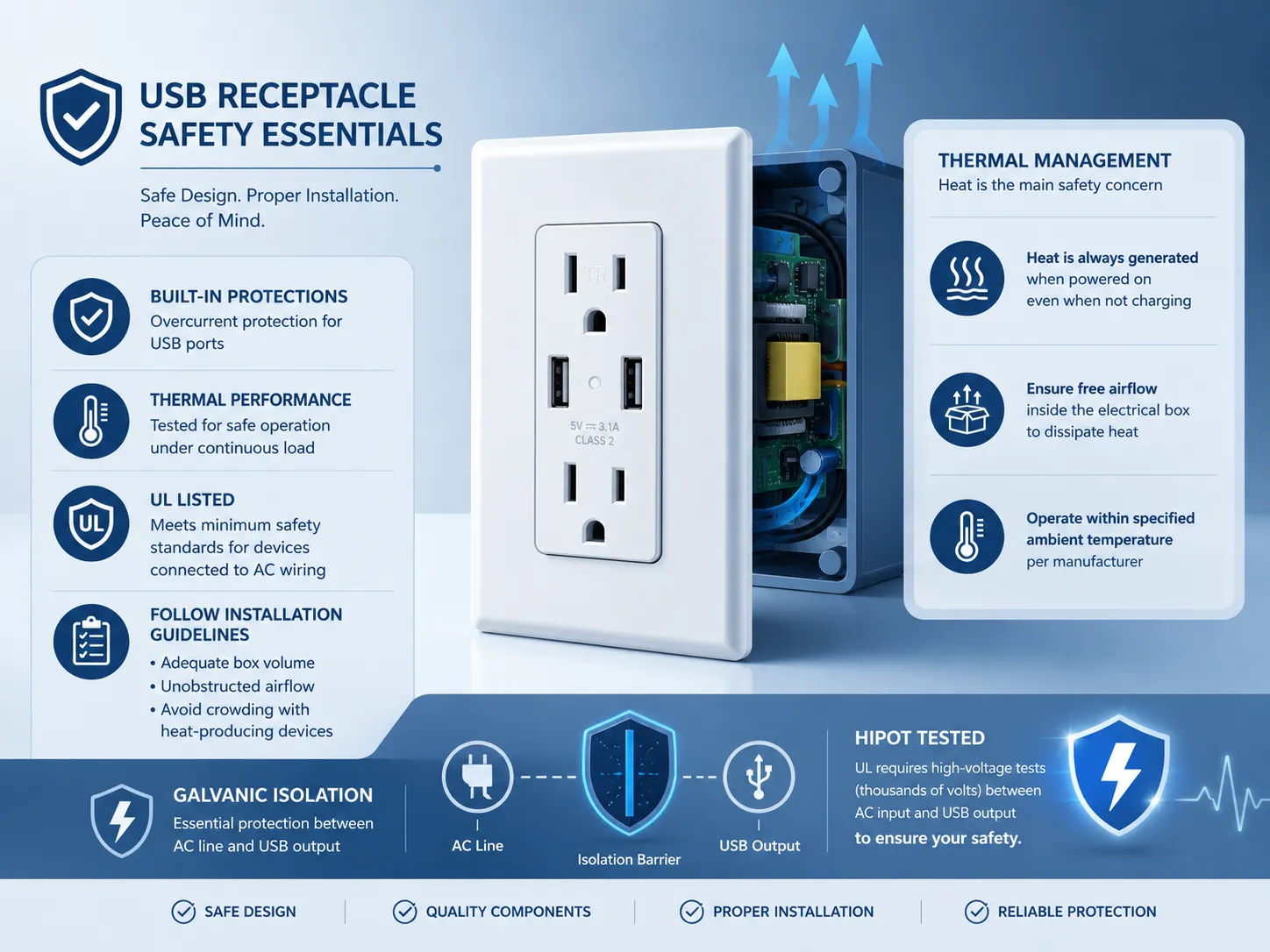
How safe a plug receptacle with USB outlets will be depends upon its internal electronic components and if they have been installed correctly. A USB receptacle has been tested for dielectric resistance (from AC line voltage to DC USB output), as well as overcurrent (due to too much current flowing) protection from the USB ports (overcurrent devices connected to USB ports). It also has been tested for thermal performance with the device under a constant load of current.
UL listed (or equivalent nationally recognized testing laboratory) USB receptacles, in addition to passing those tests mentioned above, are minimum standards for anything permanently connected to electrical wires.
Heat is the main danger to your safety from a USB receptacle. Every time the receptacle is energized (i.e., powered on), there will be heat output from it; this includes when no devices are being charged. Heat produced from receptacles generates a significant amount of heat, and, if placed in an electrical box that is crowded with other devices and find themselves not allowing for sufficient airflow to dissipate produced heat from receptacles, they [the receptacles] will create sufficient thermal conditions which would exceed those of thermal rating and thus create hazards to both material and persons. To assist with the performance of this receptacle, manufacturers recommend the following design features; a. Thermal management must be taken into account for receptacles; b. Designing for functioning of power supplies must be accomplished utilizing efficient designs and manufacturing methods that result in acceptable levels of; c. Installing thermal protection on the power supply will be required where necessary; and d. Specifying maximum ambient operating temperature will be required for all receptacles. The installation requirements for receptacles will be [1] that the box should be large enough for free and unobstructed movement of air to allow free airflow (throughout the box); and [2] the receptacle must not be installed in a box full of heat-producing devices (i.e., dimmers; USB receptacles from any manufacturer). Only accept in the situation where the manufacturer’s instructions require grouping of devices in the same gang box.
Another factor to consider when talking about safety is isolation. Galvanic isolation is required between the USB power output and the AC line voltage. If the internal isolation barrier fails, the USB connector shell could be exposed to AC voltage. This poses a risk to life and limb. To prevent this from happening, UL requires that these types of devices pass a hipot test at thousands of volts between the AC input and the USB output before they will issue a listing.
What to Look for When Selecting a USB Charger Outlet
A variety of various USB chargers are available, including various styles, prices, performance levels, and construct quality. You may have many different aspects of USB charger sockets that you wish to compare and evaluate to determine which one is best suited for you. These features include safety and reliability over time.
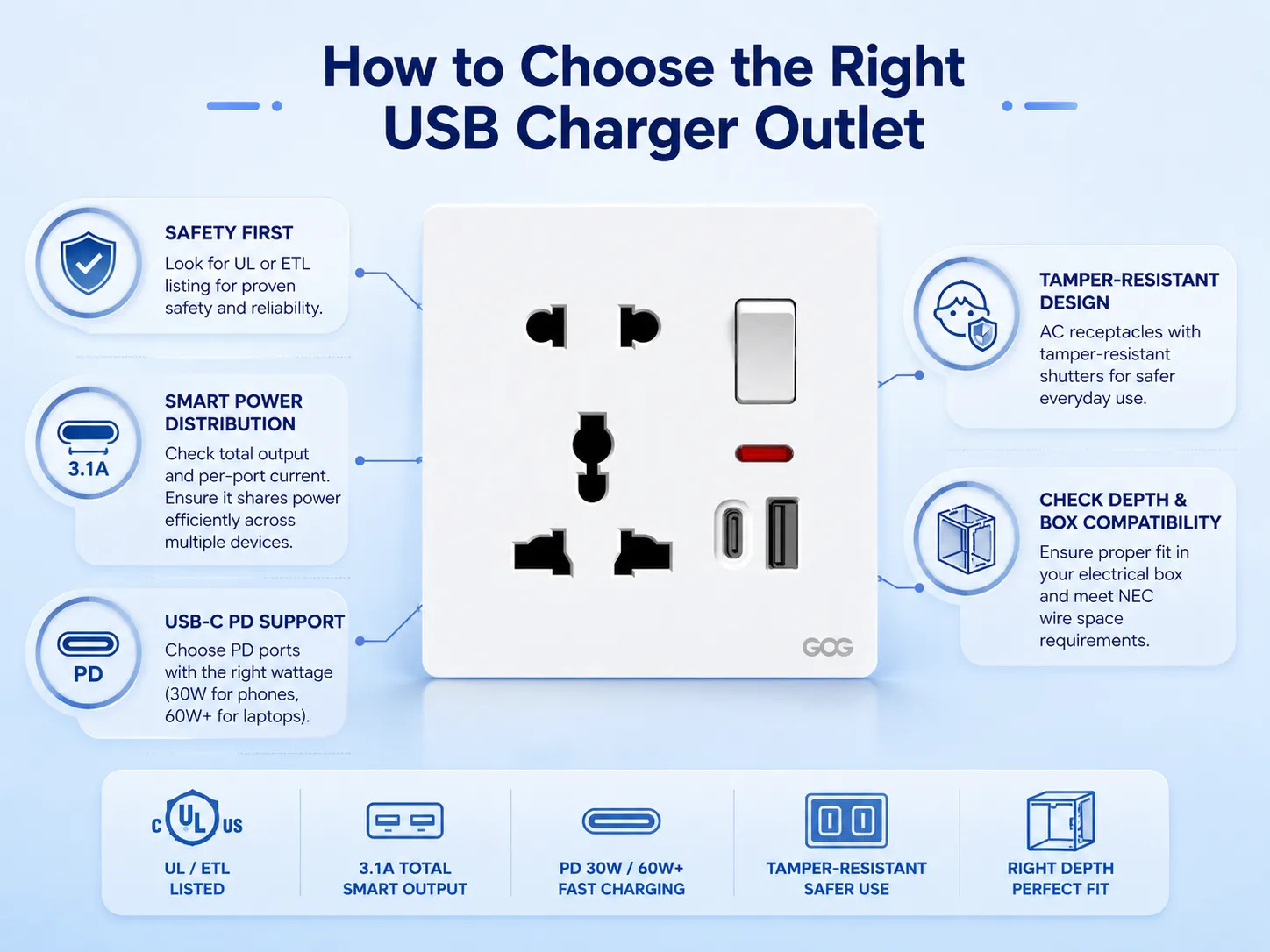
- UL or ETL listing. Third party testing shows the device is in compliance with the listing mark’s applicable safety standard.
- Total USB output current and per‑port current. The per-port maximum and total maximum values are listed separately under a section “3.1A total.” This indicates that together, the four ports provide a total combined maximum output of 3.1 amps. If you connect two devices to this same power supply, each device will use only half of the 3.1 amps, as they will share that current equally. The per-port maximum and total maximum ratings for a good power supply will be followed by additional markings that define the maximum amount of current available at each of the four connection points and the overall total available current at any one connection point. A good power supply will also automatically distribute power according to its per-port and total maximum ratings across all devices connected to it.
- USB‑C PD support, if applicable. When checking your available outlets for USB‑C access, confirm whether they support Power Delivery (PD) and note the maximum wattage rating per outlet. An outlet providing 30W of PD will provide sufficient power to quickly charge most modern smartphones. If using a 60W PD outlet, you should be able to quickly charge almost any laptop on the market.
- Tamper‑resistant AC receptacles. Conventional AC plug slots should be fitted with tamper-resistant shutters per the current residential installation code (NEC).
- Physical depth and box compatibility. Before buying an outlet, you should measure how deep it is going to be installed in the electrical box. As compared to regular outlets, USB outlets require a deeper electrical box. Therefore, if the electrical box is too shallow, the outlet may not fit with the required wire space based on NEC Article 314.
Installation Considerations: Box Depth, Wiring, and Heat
The wiring procedure for replacing a standard receptacle with a USB receptacle is the same as replacing a standard receptacle; however, there are additional limitations regarding the physical space available to install the new USB receptacle versus the existing standard receptacle and its associated wiring. The first step is to turn off the circuit breaker that delivers power to the outlet and to confirm that the power has been turned off prior to proceeding. Remove the existing outlet. Connect the black hot wire to the brass terminal, connect the white neutral wire to the silver terminal, and connect the ground wire to the green screw terminal. This requires careful folding of the wires into the rear of the box, leaving a clear path for the considerably larger rear portion of the USB receptacle. Finally, if the box is a 1970s vintage shallow plastic nail style box, you will have to replace the box as there is insufficient room to install the USB receptacle in the box since the USB receptacle requires additional space to accommodate its larger body; it will be safer to use a properly sized box than to try to fit the USB receptacle into an improperly sized box where the wires would be pressed against the back of the USB receptacle.
If you are uncomfortable with any part of this process — particularly if the existing wiring is aluminum, cloth‑insulated, or shows signs of overheating — a licensed electrician can complete the installation safely. For a step‑by‑step guide to the standard outlet replacement procedure that applies equally to USB‑equipped models, our article on how to replace a wall socket covers the process in detail.
Frequently Asked Questions
Are outlets with USB worth it?
For places that have devices being plugged in everyday (e.g., kitchens, bedroom, home office, hotel nightstand), it eliminates the need for charging adapters and allows you to use the extra standard plug slots for other things by replacing the standard wall outlet with a usb wall outlet. However, if you don’t have devices being used often (low usage), then the added expense and continued/constant draw of power (standby consumption) may not be warranted.
Are USB plugs being phased out?
As USB-C becomes the standard connector, USB-A will be phased out. Although there are some regulatory requirements that require USB-C connectors, USB-A cables and devices continue to be used widely throughout the industry. A dual-port outlet containing both USB-A and USB-C connectors will provide both backward compatibility and a future proof solution during transition to USB-C.
Are plug sockets with USB ports safe?
That is correct! When properly installed, they are safe to use as long as they bear a UL or ETL Listing Mark. A USB Charger Outlet that is UL or ETL Listed has been tested for; Electrical Isolation between the AC Line and the USB Output; OverCurrent Protection; and Thermal Performance of the USB Charger. Additionally, the USB Charger Outlet must be installed in an adequately sized electrical box to ensure safe operation.
What is the best USB plug?
A UL listed tamper resistant duplex receptacle is the best USB charging socket when two USB ports are needed, but only one of the ports has to be a USB C (power delivery) port that outputs at least 30W. The second USB A port will provide backward compatibility with previous USB devices, and both ports must provide at least ^3⁄4 amp output or current for charging multiple devices at the same time. The charger must also fit comfortably in the wall electrical box without damaging or crowding the other wiring in the box.
A socket with USB charging is more than a convenience — it is a permanent upgrade to the electrical infrastructure of a room. It places device charging where people actually use their devices, eliminates the clutter of adapters and power strips, and signals that the home or business was built or renovated with current technology in mind. The key to a successful installation is selecting a listed, well‑designed device, installing it in a box that can accommodate its deeper body and its heat output, and matching the USB port types to the devices that will be plugged in. GOG Electric manufactures USB‑equipped receptacles that meet these criteria, with the tamper‑resistant AC slots, the UL listing, and the USB‑C PD capability that today’s charging demands require.